
MarMonix MTV-320 Pro Thermal Camera (Wi-Fi + PC Software) Guide
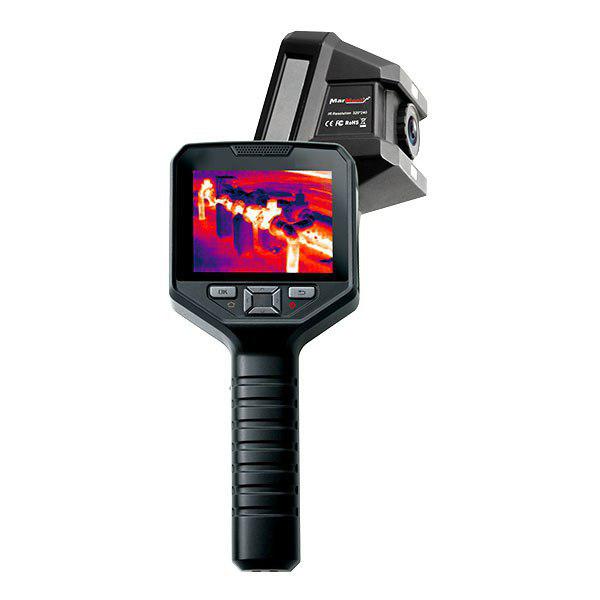
The MarMonix MTV-320 Pro is the connected member of the MarMonix thermal range — an infrared thermal imaging camera built around Wi-Fi and dedicated PC software. Its defining strength is not just capturing thermal images, but moving them quickly into reports, archives, and analysis on your computer. For anyone whose job ends in a document rather than a glance, that workflow is the difference. This guide explains what the MTV-320 Pro is, where its connectivity pays off, and how to use it well.
To see how it compares with the rest of the range, read our thermal imaging camera buyer’s guide and browse the thermal cameras category. For the current specification and price, visit the MTV-320 Pro product page.
What the MTV-320 Pro Is
The MTV-320 Pro is an infrared thermal imaging camera with built-in Wi-Fi and companion PC software. It captures the same kind of colour-mapped heat images as any thermal camera, but adds a streamlined path from the field to a finished report — wirelessly sharing images and analysing them on a larger screen.
Who it is for
It is ideal for users who document and report: maintenance teams building inspection records, consultants delivering client reports, and researchers across fields as varied as medicine, archaeology, transport, and agriculture, where thermal data must be stored, compared, and analysed rather than simply viewed.
Why Connectivity and Software Matter
Wi-Fi sharing
Built-in Wi-Fi lets you move thermal images off the camera without cables or card readers — straight to a phone, tablet, or computer. On a busy site, that saves real time and keeps your records organised as you go.
PC analysis software
The software is where raw thermal data becomes insight. On a full-size screen you can re-analyse an image after the fact — adjust the temperature scale, add spot and area measurements, change palettes, and export a clean, annotated report — all without returning to the equipment.
Repeatable reporting
Because images and their analysis live on your PC, you can trend a component over time, compare this month’s scan with last month’s, and produce consistent, professional documentation. That repeatability is the heart of a credible inspection programme.
Typical Applications
Maintenance and facilities
Capture electrical and mechanical inspections on site, then build a documented maintenance history on your computer that supports planning and proves due diligence.
Research and specialised fields
In medicine, archaeology, transport, and agriculture, the ability to archive and analyse thermal images carefully — rather than read them once in the field — is exactly what the work demands.
Consulting and reporting
Deliver client-ready reports with annotated images and measurements, generated efficiently thanks to the software workflow.
Where It Fits in the MarMonix Range
The MTV-320 Pro is the choice when workflow and reporting matter most. If you instead prioritise raw image quality, look at the flagship HTV 340 LPRO; for an affordable everyday handheld, the MTV 256 PRO is excellent value; and for ultra-portable phone-based imaging, see the MTV-ONE PRO. Pick the MTV-320 Pro when getting images into reports quickly is the priority.
How to Get Accurate Results
Connectivity does not replace good technique. Let the camera acclimatise, set the correct emissivity, and avoid measuring reflective metal head-on. Inspect under normal load, keep the target in focus, and — because you will analyse later — record ambient conditions and load with each image so the data still makes sense on your PC days afterwards.
From field to report
Capture broadly, confirm the hottest point, transfer over Wi-Fi, then finalise the analysis and annotations in the software. A consistent capture-and-transfer routine keeps your archive clean and searchable.
Strengths, Limitations, and Value
Strengths
Its strengths are wireless transfer and a genuine PC analysis workflow — the features that turn inspection into documentation. For report-driven work, that is precisely what saves time.
Limitations
If your work never leaves the field and you simply need a quick live/dead heat check, the connectivity is less critical and a simpler handheld may suffice. Buy for your real workflow.
Total value
For teams that produce reports, the hours saved transferring and analysing images — and the professionalism of the output — typically justify the camera many times over.
Building a Thermal Inspection Archive
The real long-term payoff of a connected camera is the archive it lets you build — a structured history of your assets that grows more valuable with every inspection.
Why an archive matters
A single thermal image tells you the condition of a component today. A series of dated, comparable images tells you its trend — whether a connection is slowly heating up, or a motor is gradually running hotter. Trends are what let you schedule a repair before a failure, and that requires images stored and organised on a computer, not lost on a memory card.
Organising your data
Name and tag images by asset and location, keep the load and ambient conditions with each one, and review them on a large screen where small differences are easy to see. A disciplined archive turns the MTV-320 Pro from a camera into a maintenance-planning tool.
Sharing with stakeholders
Because images move easily over Wi-Fi and export cleanly from the software, you can share findings with managers, clients, or contractors the same day — closing the loop between inspection and action quickly.
Frequently Asked Questions
What does the PC software add?
It lets you re-analyse images on a large screen — adjusting the scale, adding measurements, changing palettes, and exporting annotated reports — long after the inspection.
Do I have to use Wi-Fi?
No, but Wi-Fi is the fastest way to move images into your reporting workflow without cables or card readers.
Is it suitable for research use?
Yes. Its archiving and analysis workflow suits fields such as medicine, archaeology, transport, and agriculture, where thermal data is studied rather than glanced at.
How do I keep readings accurate?
Set the correct emissivity, avoid reflective surfaces, inspect under normal load, and record conditions with each image for later analysis.
Related Guides and Models
Compare the full line-up in our thermal imaging cameras buyer’s guide, see the video borescopes guide for internal inspection, or browse every model in the thermal cameras category.